
Participants
The Participants tab shows who is in the room, split into Game masters, Players and Spectators. At the top are Invite friends, Talk to the GM (a direct chat with the room owner, for anyone who isn’t them), Group chat… and Voice and video.
The card
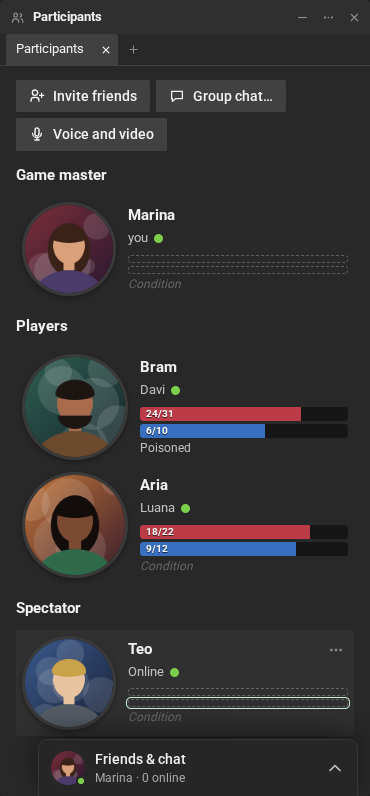
Section titled “The card”Each person has a card with:
- the picture (the one for this room, if the person chose one; otherwise, their profile’s);
- the main character’s name, with the person’s name below it (without a character, their name or nickname);
- the green online dot, and “typing…” while they write;
- the bars (health, energy…) and free-text lines (a condition, for example). How many show up, their names and their colors are the room’s game rules.
Double-click the card to open the person’s profile.
Bars and lines
Section titled “Bars and lines”In most rooms, the main character’s sheet fills in the bars: change the health on the sheet, and the bar changes. You can also change them directly:
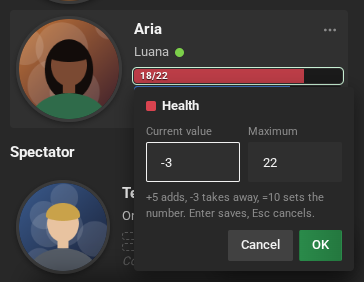
- Double-click one of your bars to open the editor, with the Current value and the
Maximum. Type a number, or
+5to add,-3to take away,=10to set the number. Enter saves, Esc cancels. - Double-click one of your lines to write in it, right there. The cursor goes to the end of the text, without erasing what was there. Enter or clicking elsewhere saves, Esc cancels. Empty lines show faded, with their name, only to those who can write in them.
- Card bars and lines…, in your name’s menu, edits everything at once.
You change your own bars and lines; the game master changes everyone’s. When a bar changes, the chat says so, for example “Davi’s Health: -4” (turn it off in Settings → Chat).
A person’s menu
Section titled “A person’s menu”Right-click the name (or the card’s … button):
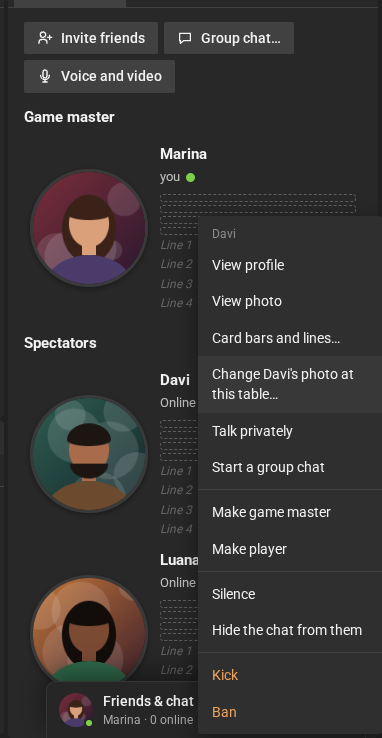
- View profile;
- View photo: the card’s photo at a large size (only when the person has a photo);
- Open …’s sheet, the main character’s;
- Chat: a direct chat with the person, at the bottom, even if they aren’t your friend (see Chatting with people who aren’t your friends);
- Talk privately and Start a group chat, the room’s conversations (see Chat);
- on your own name: Card bars and lines…, Change my photo at this table…, Change my nickname and Stop using a main character.
The game master has more options: roles, silencing, kicking, creating and handing out sheets. See Roles and moderation.
Your picture in this room
Section titled “Your picture in this room”In each room, you can use a different picture, your character’s: Change my photo at this table…, in your name’s menu. The image comes from your computer and is cropped to a square. Go back to my profile photo removes this room’s picture. The game master can also change anyone’s picture in their room.