
Roles and moderation
Each person in the room has a role:
| Role | What they can do |
|---|---|
| Game master | everything: the whole library, the scenes, everyone’s sheets, the others’ roles |
| Player | their own sheet, their own tokens, drawing and pinging on the scene |
| Spectator | watching and chatting; no sheet, no drawing, no pinging |
- The room’s owner and the assistant game masters (see Room settings) always join as game masters.
- Whoever joins for the first time is a spectator. Next time, they come back with the role they had.
Change someone’s role
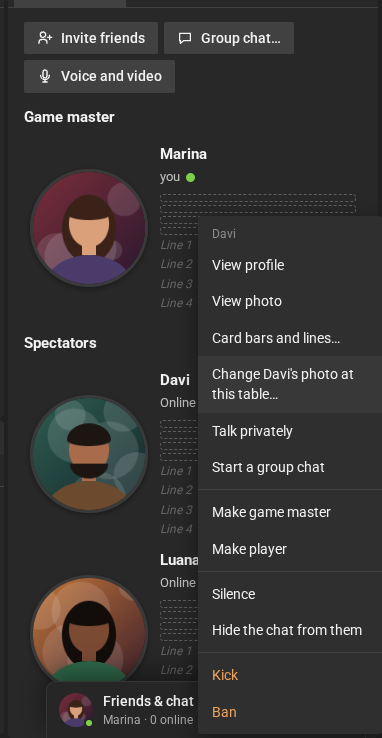
Section titled “Change someone’s role”Right-click the person’s name, in Participants, and choose Make game master, Make player or Make spectator. The chat announces the change to everyone.
Moderation
Section titled “Moderation”In the same menu:
- Silence (and Allow to talk): the person cannot talk in the chat.
- Hide the chat from them (and Show the chat again): the person only sees their own messages and the system notices.
- Kick: removes the person from the room. They can come back.
- Ban: removes the person and does not let them come back. The account goes to the Banned list, in Room settings → System, from which Remove takes it off.
The person’s card shows when they are silenced, not seeing the chat or have voice.
Moderated chat
Section titled “Moderated chat”Moderate chat, the shield button on the chat toolbar (game masters only): only game masters and people with voice can talk. To give someone voice, their menu gains May talk in moderated chat. While the chat is moderated, everyone sees the “Chat is moderated” strip; for game masters it has End, which goes back to normal (the same as clicking the button again).